

VR TRAINING FOR EMPLOYEES
Practical learning in realistic situations
VR training for employees enables companies not only to explain knowledge, procedures, and behavior, but to have them actively practiced. Instead of merely observing a situation in a presentation, a video, or an e-learning module, employees take action themselves in a simulated environment. They make decisions, execute work steps, speak with virtual persons, or react to situations that would be expensive, rare, risky, or difficult to organize in everyday work life.
VR Training for Employees at a Glance
That is precisely the strength of virtual reality in corporate learning. Good VR training for employees does not globally replace existing training formats. It complements them where active engagement, spatial understanding, repetition, and situational learning offer real added value.
Design4real develops custom VR training for companies – from technical processes to safety and Communication training up to simulation-based learning applications. This does not focus on VR headset not the focus, but the learning objective. Only when it is clear what employees should understand, decide, or execute better after the training will the appropriate didactic and technical concept be developed.


When is VR training suitable for employees?
VR training for employees is particularly well-suited for learning objectives where traditional media can only depict part of the task. A manual can describe a process. A video can show it. An interactive VR simulation, on the other hand, requires the employee to correctly execute the process themselves.
Typical application areas are:
- technical operating and process training
- Machine and Plant Training
- Safety trainings
- Onboarding new employee
- Communication and soft skills training
- Service and maintenance training
- Quality and process understanding
- Training for rare disruptions or emergency situations
- Product and Sales training
- medical and nursing training
VR is particularly useful when an error in real-world training would be expensive or dangerous, real training environments are only available to a limited extent, or employees at different locations need to be trained to comparable standards.
From Being a Spectator to Taking Action
The decisive difference lies in the interaction. In VR training for employees, for example, the user can grab a virtual tool, operate a switch in the correct sequence, identify a source of error, or respond to a virtual customer in a conversation.
This brings training closer to the actual action. A 2024 systematic literature review on immersive procedural training shows an overall positive medium effect on learning outcomes compared to less immersive learning environments. The effects were particularly large regarding knowledge transfer. At the same time, the authors emphasize that study designs and training formats vary greatly. VR should therefore not be understood as an automatically superior medium, but rather used selectively where content and technology match.
Which types of VR employee training are useful?
Not every VR training for employees looks the same. The appropriate training format depends on whether the main focus is on training physical movements, decision-making, communication, or spatial relationships.
Technical workflows and process training
During technical training, a machine or system can be built as an interactive 3D model. For example, employees learn which components are relevant, the sequence in which work steps are performed, and how to respond to defined malfunctions.
This can be particularly valuable for complex machines because real systems do not have to be permanently blocked for training. In addition, components, internal views, or conditions that are difficult to see in reality can be visualized.
For in-depth technical training, the Design4real page „VR Training for Machinery and Equipment“ is designated as a specialized subpage.
Safety training without real risk
Dangerous situations can be simulated in VR without exposing people or equipment to real risks. These include, for example, fire and evacuation scenarios, hazardous areas, maintenance situations, or operating errors.
A meta-analysis in the journal Safety Science examined 52 papers on VR safety training. The results point to advantages over traditional Safety training in knowledge acquisition and retention. At the same time, the long-term impact was not sufficiently investigated in many studies. For companies, this means that VR can be an effective training component, but it should be embedded in an overall concept that includes repetition, transfer to everyday work, and appropriate performance monitoring.
For this topic, please refer to the specialized landing page „Develop VR Safety Training“.
Communication and soft skills
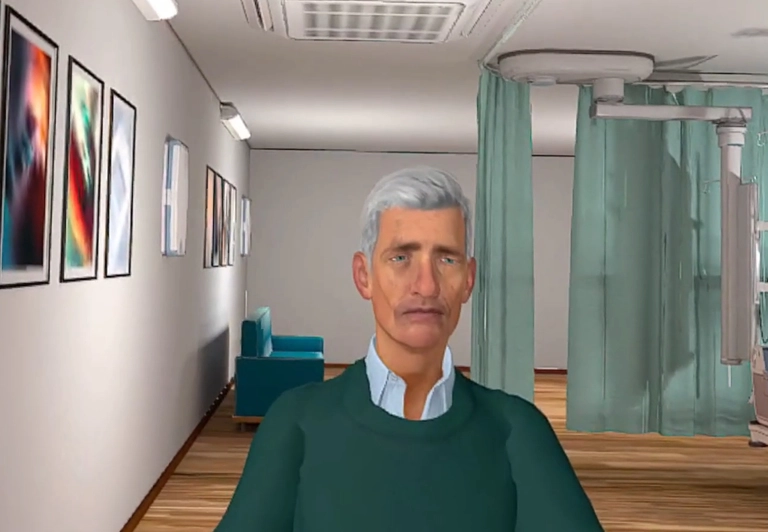
VR training for employees can also depict situations where the focus is not on a machine, but on a conversation. Virtual characters enable simulation-based training for consulting, leadership, conflict situations, technical terminology, or customer conversations.
Design4real has with EmpathAI for example, developing AI-supported specialized language training for medical and nursing professionals. Users practice conversational situations in a virtual environment and receive feedback on their statements.
The project as well „Imagine“ shows another form of simulation-based learning. There, everyday nursing situations are made experiential in VR so that nursing staff can practice decision-making and patient interaction in a safe environment.
Onboarding and Orientation
VR employee training can familiarize new hires with rooms, processes, or typical situations even before their first day on the job. Especially in large production facilities, laboratories, logistics centers, or spatially complex work environments, virtual onboarding can support orientation.
It is not necessary to build the entire company as a detailed digital copy. Often, it is sufficient to map the areas relevant to the learning objective realistically and combine them with specific tasks.
How does Design4real develop VR training for employees?
Effective training is not created by simply transferring existing training slides into a VR environment. The crucial factor is translating the learning objective into a meaningful interaction.
Define learning objectives and target audience
At the beginning, we clarify which employees are to be trained and what specific skills they must possess after the training. Should an operating sequence be learned, a process understood, or a conversation situation practiced?
Equally important are existing prior knowledge, language, training duration, and organizational framework conditions.
Analyze existing training content
Companies do not have to start from scratch. Existing training materials, SOPs, videos, CAD data, 3D models, photos, or e-learning content can serve as a basis.
We are reviewing which information can be carried over and which content needs to be restructured for VR employee training.
Develop training process and interactions
Subsequently, the didactic and interactive concept is created. This includes tasks, user guidance, feedback, potential error states, and success criteria.
Depending on the project, the training can be structured linearly or allow for multiple solution paths. For recurring training sessions, a practice mode can also be combined with an examination mode.
Produce virtual environment and assets
For technical applications, existing CAD data can be processed and optimized for real-time rendering. Other trainings require custom-built rooms, tools, characters, or animations.
Maximum level of detail at any cost is not what matters. The visual design must support the learning objective and run with good performance on the target hardware.
Testing with real users
Early testing is particularly important when it comes to VR training for employees. Even if procedures are technically correct, they can still be unclear from the user's perspective. Therefore, employees or subject matter experts should test the training before the rollout.
Among other things, we evaluate interactions, comprehensibility, ergonomics, training duration, and technical stability.

Hardware and rollout in the company
For a single pilot project, the hardware question is comparatively simple. However, as soon as VR training is to be used for employees at multiple locations or with many devices, the deployment becomes part of the project.
Therefore, Design4real checks not only computing power and tracking, but also points such as:
- Kiosk Mode
- App distribution
- Device management
- User guidance
- Update processes
- Wi-Fi and offline operation
- Hygiene and Accessories
- Support and replacement devices
- Privacy and User Accounts
Currently the PICO 4 Ultra Enterprise an available enterprise platform that supports, among other things, the PICO Business Suite and Device Manager for business applications. PICO highlights features such as remote management, content deployment, customizable home screen, and kiosk mode. For scaled training rollouts, such management features can be more important than individual display specifications.
The specific hardware recommendation is nevertheless reassessed for each project. Device generations change quickly, and an application should ideally be developed in such a way that later porting is not unnecessarily complicated. Consumer hardware such as the Meta Quest may be technically relevant for certain applications, but is not positioned by Design4real as a blanket preferred enterprise platform.
How much does VR training for employees cost?
The costs depend more on the training content than on the number of VR headsets.
A focused pilot is therefore often more sensible than planning a very large training system right away. A real-world use case can be used to verify whether the user interface, instructional design, and organizational rollout work as intended.
General orientation regarding budgets and cost drivers is provided by the Design4real page „How much does a VR application cost?“.
- Number and complexity of training scenarios
- Scope of 3D production
- existing CAD or 3D data
- virtual characters and animations
- Hand tracking or controller interaction
- Voice recognition or AI features
- Multilingualism
- Evaluation and Learning Analytics
- Interfaces to LMS or enterprise systems
- Target hardware and deployment
- desired degree of realism
VR Training for employees with Design4real
Design4real has been developing custom XR applications for over ten years, combining conception, 3D production, interaction design, and technical development.
Our experience ranges from technical and industrial applications to simulation-based training with virtual personas. In doing so, we do not view VR in isolation. If a training goal with Mixed Reality, tablet, touchscreen or classical e-learning can be solved better, the technology should be chosen accordingly.
VR training for employees is particularly useful when workers have to take action themselves, spatial understanding is important, or real practice situations are difficult to reproduce.
We support companies from the initial use case analysis, through storyboarding and prototyping, to rollout on suitable enterprise hardware.
Talk to us about your training process. Together, we will examine which parts of it can be sensibly implemented as interactive VR training and how this can be developed into a scalable learning system for your employees.
Matching services: Virtual Reality · EmpathAI: AI-powered Technical Language Training · Imagine | VR Training
Further sources: sciencedirect.com · sciencedirect.com · business.picoxr.com


Frequently asked questions about VR training for employees
VR training is suitable for technical specialists, service personnel, production workers, nursing staff, sales and service teams, as well as employees who need to train communication, safety, or recurring processes. The decisive factor is not the industry, but whether a learning objective benefits from active engagement and realistic simulation.
Yes. Existing SOPs, presentations, videos, CAD data, and 3D models can often be used as a basis. CAD data generally needs to be technically optimized for VR. Training content is also restructured for interactive use.
The hardware depends on the training concept and rollout. For larger enterprise installations, device management, kiosk mode, and content deployment are important criteria. Currently, for example, the PICO 4 Ultra Enterprise may be relevant for such applications. Before each new project, the current market situation should be reviewed again.
A focused pilot can be created within a few weeks, depending on the scope. Complex trainings with multiple scenarios, extensive 3D production, virtual characters, or interfaces take several months. A reliable schedule is established after defining the specific use case.
Yes. With a modular architecture, new scenarios, languages, machines, difficulty levels, or examination modes can be added. This extensibility should already be taken into account during the technical design phase.
In most cases, no. VR is particularly strong in active, spatial, and simulation-based learning. Theory, legally required training, instructor-led training, or practical work on real systems may still be necessary. A blended learning approach is often useful.
Let's talk about your project.
Whether Virtual Reality, Augmented Reality, or WebAR: We provide tailored advice and develop immersive applications that fit your brand and target audience. Free initial consultation, personal and at eye level.
+49 179 3927971 · info@design4real.de · Lindwurm St. 95a, Munich